fxNP Depth 1.9After Effects · Premiere Pro
Depth from any shot.Then use it.
AI depth, worked out on your Mac, turns flat footage into layers you can move a camera through, blur like a real lens, fill with fog, or turn into heat maps, contours and holograms.
 fx NP Depth
What it does
OUT 00:00:00:00NP Depth works out how far away every pixel is, from a single photo or a video, without a depth camera.
Parallax gives stills and locked-off shots a 2.5D camera move: push in, orbit, vertigo, float. The picture splits into layers at its depth edges and the gap that opens is filled from the background only.
Depth Blur is a lens blur with real bokeh (circle or aperture blades), and the sharp foreground never bleeds into it. Click Focus From Point to pick what stays sharp. Fog adds atmosphere that thickens with distance.
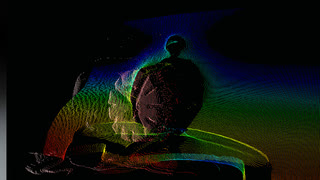
Visualise modes turn the depth itself into the picture: Heat Map, Thermal Camera, X-Ray, Depth Contours, Point Cloud, Depth Slice and Kinect Point Cloud. 3D Dissolve and Hologram Build are transitions that travel through the shot from near to far.
How it works
OUT 00:00:00:00Depth on your Mac
Depth Anything V2 Small runs on device and is refined to full resolution along the picture’s edges.
Steady on video
Neighbouring frames are aligned with optical flow, so the depth doesn’t flicker (Temporal Smoothing, Steady Video Depth).
Layers and fill
For camera moves the shot splits into layers; what opens up behind them is filled (Layered Inpaint or Layered Mirror).
Render
The chosen mode renders from the depth: camera, lens, fog, palette or particles. 8, 16 and 32 bpc.
Key controls
OUT 00:00:00:00The real parameter names, as they appear in Effect Controls.
- Mode
- Parallax, Depth Blur, Fog, Depth Matte, the Visualise modes, transitions or Kinect Point Cloud.
- Depth Quality
- Fast, Normal, High or Ultra.
- Near · Far
- Which slice of the depth range the effect uses.
- Focus Depth · Focus From Point
- Set the focus by value, or click a point in the picture.
- Camera X · Camera Y · Zoom
- The 2.5D camera move; Rotation and Dolly Zoom on top.
- Animate
- Ease In-Out, Linear, Swing or Float, with no keyframes.
- Fill Method
- Layered Inpaint, Layered Mirror or Classic Stretch.
- Blur Amount · Near Blur · Far Blur
- Lens blur in front of and behind the focus.
- Bokeh Shape · Blades
- Round bokeh or aperture blades; Highlight Bloom for bright spots.
- Fog Color · Fog Density
- Atmosphere between Fog Start and Fog End.
- Matte Output
- Depth as Grey or as Alpha, for other effects.
- Palette
- Thermal, Iron, Turbo, Inferno, White Hot, Black Hot, Arctic or a custom gradient.
- Contour Lines · Contour Spacing
- Lines of equal depth, glowing and moving if you like.
- Progress · Edge Style
- Drives the transitions: Particles, Wireframe, Scan Line or ASCII.
The effect always renders the whole layer, because depth needs the whole picture.
One-click looks
OUT 00:00:00:00Every look is a starting point in the effect’s own Look menu. Change anything after.
- Slow Push In
- Portrait Bokeh
- Orbit Left
- Vertigo
- Morning Fog
- Tilt Shift
- Depth Matte
- Thermal Heat
- X-Ray
- Contour Glow
- LiDAR Dots
- LiDAR Scan
- Depth Slice Reveal
- Hologram Build Cyan
- 3D Dissolve Out
- Wireframe Reveal
- Particle Vanish
- ASCII Build
- ASCII Dissolve
- Hologram Stripes
- Hologram Particles
- Kinect Rainbow
- Kinect IR
- Kinect Source Color
- Point Cloud Orbit
- Kinect Scatter
- Kinect Glitch Scan
Transitions in the Library
Keyframed set-ups: Progress, Scan or Slice already animated.
- Hologram Build
- 3D Dissolve
- Wireframe Build
- Particle Vanish Out
- ASCII Build
- ASCII Dissolve Out
- LiDAR Reveal
- Depth Reveal
- Hologram Dissolve
- Kinect Scatter Out
- Kinect Assemble
- Kinect Orbit Move
- Kinect Scan Reveal
Where it fits
OUT 00:00:00:00Stills into motion
Photo-heavy edits, documentaries and event slides get a real camera move.
Product and title shots
Focus pulls, fog and depth of field without a 3D render.
Music videos and events
Thermal, contour, LiDAR and hologram looks from ordinary footage.
Compositing
A depth matte to drive other effects, as grey or as alpha.
More effects
Each one lives in the same panel, with its looks built in.
- NP KinectFootage as a Kinect point cloud.
- NP Depth2.5D moves, lens blur and depth looks.
- NP RetimeAI slow motion and speed ramps.
- NP Light SweepType and logos in chrome, gold or glass.
- NP TraceTracking HUD with boxes, labels and lines.
- NP DenoiseReal-time noise reduction, AI for the final.
- NP RelightNew light on finished footage.
Beta · invite-only
Be one of the first.
NP effects come with the NoProblem! panel. We’re growing the beta with a small group of editors.
RequirementsAfter Effects and Premiere Pro · macOS. The depth model runs on your Mac.