fxNP Trace 4.4After Effects
A tracking HUDon real footage.
Finds people, objects, animals, motion or bright spots, follows them with steady IDs, and draws boxes, labels, lines and glitch over them.
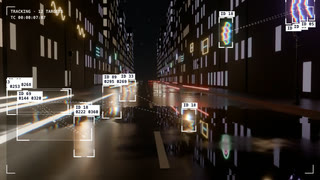 fx NP Trace
What it does
OUT 00:00:00:00The surveillance-camera, sports-telemetry look, without tracking a single point by hand.
Pick what to follow with Detect: Feature Points, People, Faces, Objects, Animals, Motion, Color Key, Brightness or Edges. NP Trace finds the targets, gives each a steady ID and follows it from the layer’s in point.
Then dress it: boxes, corners, reticles or contours; labels with coordinates, IDs, speed or time code; lines that connect the targets as a chain, a web or a PCB trace; a grid and measurement axes for the HUD.
FX Stack adds the edit-room energy: fill boxes with invert, pixelate, thermal or glitch, echo the boxes, flash an invert on impact. It is off by default, so existing projects render exactly as before.
How it works
OUT 00:00:00:00Detect
Apple Vision finds people, faces, objects and animals on your Mac. Motion detection subtracts the camera’s own movement.
Track
Targets are followed forward from the in point with fixed IDs. Short-lived targets are dropped; lost ones fade out.
Same every time
Each frame depends only on the frames before it, so it renders the same in any order. A cache makes playback step by step.
Draw
Drawing happens per frame, so every visual setting can be keyframed. Tracking settings are read once, at the start.
Key controls
OUT 00:00:00:00The real parameter names, as they appear in Effect Controls.
- Detect
- Brightness, Color Key, Motion, Edges, Feature Points, People, Faces, Objects or Animals.
- Threshold · Min Size · Max Size
- What counts as a target.
- Max Objects
- How many targets at once.
- Smoothing (frames)
- Steady boxes without lag.
- Shape
- Box, Corners, Circle, Crosshair, Reticle, Dashed Box, Contour, Rounded Box, Brackets, Diamond.
- Connect · Line Style
- Chain, Nearest, Web, Tree and more; Straight, Smooth Bend, Arc, Step Bend or PCB Trace.
- Label
- Coordinates, Node ID, Area, Speed, Time Code, Confidence or Custom.
- Fill Effect
- Invert, Pixelate, Blur, Tint, Threshold, X-ray, Glitch, Thermal and more inside the box.
- Acquire
- How a new target appears: Grow, Blink, Snap or Type-on.
- Only Moving
- Ignore what stands still.
- Grid · Measurement Axes
- HUD layer with Frame Corners and Center Cross.
- FX Stack
- Stack Fill, Stack Flicker, Box Echo, Frame Glitch, Invert Flash, Motion Reactive.
Custom labels: rename the effect, for example “NP Trace: ID {id} {conf}”, and the label follows. Tokens include {id}, {x}, {y}, {speed}, {time} and {class}.
One-click looks
OUT 00:00:00:00Every look is in the effect’s own Look menu. Change anything after.
- Classic Track
- Red Alert
- Cyber Blue
- Thermal Vision
- Film Credits
- Face ID
- Traffic Cam
- Sports Telemetry
- Invert Squares
- Object Tags
- Pet Tracker
- Color Key Sizes
- Pixel Cells
- Contour
- X-Ray
- Pixel Censor
- Glitch Boxes
- Surveillance
- Motion Hunter
- Neon
- Sport Glitch Lock
- Impact Invert Stack
Where it fits
OUT 00:00:00:00Sport and motorsport
Telemetry boxes and speed readouts that follow the action.
Tech and product launches
A clean HUD that makes any footage feel analysed.
Music videos
Glitch boxes and invert flashes cut to the beat.
Trailers and social
Surveillance, thermal and object-tag looks in one click.
More effects
Each one lives in the same panel, with its looks built in.
- NP KinectFootage as a Kinect point cloud.
- NP Depth2.5D moves, lens blur and depth looks.
- NP RetimeAI slow motion and speed ramps.
- NP Light SweepType and logos in chrome, gold or glass.
- NP TraceTracking HUD with boxes, labels and lines.
- NP DenoiseReal-time noise reduction, AI for the final.
- NP RelightNew light on finished footage.
Beta · invite-only
Be one of the first.
NP effects come with the NoProblem! panel. We’re growing the beta with a small group of editors.
RequirementsAfter Effects · macOS. Detection runs on your Mac.